Memory Cards Information
|
| | | | | Area | | Volume | | Weight | | Connectors | | Interface | | Max. | | Storage | | | |
| Card Type | | Short | | W | | L | | Th. | | (approx.) | | (approx.) | | (typical) | | # | | Location | | Type | | Clock | | Bus Width | | Transfer | | Limit | | Online Resources | |
|
| PCMCIA, Type I | | PCMCIA-I | | 54.0mm | | 85.6mm | | 3.30mm | | 46.22cm² | | 15.25cm³ | | | | 68 | | front edge | | internal | | | | 8-bit, 16-bit | | | | | | http://www.pcmcia.org/ | |
|
| PCMCIA, Type II | | PCMCIA-II | | 54.0mm | | 85.6mm | | 5.00mm | | 46.22cm² | | 23.11cm³ | | | | 68 | | front edge | | internal | | | | 8-bit, 16-bit | | | | | | http://www.pcmcia.org/ | |
|
| PCMCIA, Type III | | PCMCIA-III | | 54.0mm | | 85.6mm | | 10.50mm | | 46.22cm² | | 48.54cm³ | | | | 68 | | front edge | | internal | | | | 8-bit, 16-bit | | | | | | http://www.pcmcia.org/ | |
|
| PCMCIA, Type IV | | PCMCIA-IV | | 54.0mm | | 85.6mm | | 18.00mm | | 46.22cm² | | 83.20cm³ | | | | 68 | | front edge | | internal | | | | 8-bit, 16-bit | | | | | | http://www.pcmcia.org/ | |
|
| CardBus | | CardBus | | 54.0mm | | 85.6mm | | 5.00mm | | 46.22cm² | | 23.11cm³ | | | | 68 | | front edge | | internal | | 33MHz | | 32-bit | | 133.3M | | | | http://www.pcmcia.org/ | |
|
| DVCPRO P2 (CardBus) | | P2 | | 54.0mm | | 85.6mm | | 5.00mm | | 46.22cm² | | 23.11cm³ | | | | 68 | | front edge | | internal | | 33MHz | | 32-bit | | 4×SD | | 4×SD | | http://www.panasonic.com/p2/ | |
|
| ExpressCard/54 | | Express/54 | | 54.0mm | | 75.0mm | | 5.00mm | | 40.50cm² | | 20.25cm³ | | | | 26 | | front edge | | internal | | | | | | 2.5Gbit/s | | | | http://www.expresscard.org/ | |
|
| ExpressCard/34 | | Express/34 | | 34.0mm | | 75.0mm | | 5.00mm | | 25.50cm² | | 12.75cm³ | | | | 26 | | front edge | | internal | | | | | | 2.5Gbit/s | | | | http://www.expresscard.org/ | |
|
| SxS (ExpressCard/34) | | SxS | | 34.0mm | | 75.0mm | | 5.00mm | | 25.50cm² | | 12.75cm³ | | | | 26 | | front edge | | internal | | | | | | | | | | | |
|
| Compact Flash, Type I | | CF-I | | 42.8mm | | 36.4mm | | 3.30mm | | 15.58cm² | | 5.14cm³ | | | | 50 | | front edge | | internal | | 16MHz | | 8-bit, 16-bit | | 133.3M | | | | http://www.compactflash.org/ | |
|
| Compact Flash, Type II | | CF-II | | 42.8mm | | 36.4mm | | 5.00mm | | 15.58cm² | | 7.79cm³ | | | | 50 | | front edge | | internal | | 16MHz | | 8-bit, 16-bit | | 133.3M | | | | http://www.compactflash.org/ | |
|
| Secure Digital Card (SD 1.01) | | SD | | 24.0mm | | 32.0mm | | 2.10mm | | 7.68cm² | | 1.61cm³ | | 2.0g | | 9 | | bottom | | exposed | | 25MHz | | 1-bit, 4-bit | | 12.5M | | | | http://www.sdcard.org/ | |
|
| miniSD Card | | miniSD | | 20.0mm | | 21.5mm | | 1.40mm | | 4.30cm² | | 0.60cm³ | | 1.0g | | 11 | | bottom | | fully exposed | | 25MHz | | 1-bit, 4-bit | | 12.5M | | | | http://www.sdcard.org/ | |
|
| microSD (TransFlash, T-Flash) | | microSD | | 11.0mm | | 15.0mm | | 1.00mm | | 1.65cm² | | 0.17cm³ | | 0.4g | | 8 | | bottom | | fully exposed | | 25MHz | | 1-bit, 4-bit | | 12.5M | | | | http://www.sdcard.org/ | |
|
| Secure Digital Card 1.1 | | SD | | 24.0mm | | 32.0mm | | 2.10mm | | 7.68cm² | | 1.61cm³ | | 2.0g | | 9 | | bottom | | exposed | | 50MHz | | 1-bit, 4-bit | | 25.0M | | 2GB/4GB | | http://www.sdcard.org/ | |
|
| Secure Digital Card 2.0 | | SDHC | | 24.0mm | | 32.0mm | | 2.10mm | | 7.68cm² | | 1.61cm³ | | 2.0g | | 9 | | bottom | | exposed | | 50MHz | | 1-bit, 4-bit | | 25.0M | | 32GB | | http://www.sdcard.org/ | |
|
| MultiMedia Card (MMC 3.x) | | MMC | | 24.0mm | | 32.0mm | | 1.40mm | | 7.68cm² | | 1.08cm³ | | 1.5g | | 7 | | bottom | | fully exposed | | 20MHz | | 1-bit | | 2.5M | | | | http://www.mmca.org/ | |
|
| Reduced Size MultiMedia Card | | RS-MMC | | 24.0mm | | 18.0mm | | 1.40mm | | 4.32cm² | | 0.60cm³ | | 1.0g | | 7 | | bottom | | fully exposed | | 20MHz | | 1-bit | | 2.5M | | | | http://www.mmca.org/ | |
|
| MMCplus (MMC 4.x) | | MMCplus | | 24.0mm | | 32.0mm | | 1.40mm | | 7.68cm² | | 1.08cm³ | | 1.5g | | 13 | | bottom | | fully exposed | | 52MHz | | 1-bit, 4-bit, 8-bit | | 52.0M | | 4GB | | http://www.mmca.org/ | |
|
| MMCmobile (RS-MMC 4.x) | | MMCmobile | | 24.0mm | | 18.0mm | | 1.40mm | | 4.32cm² | | 0.60cm³ | | 1.0g | | 13 | | bottom | | fully exposed | | 52MHz | | 1-bit, 4-bit, 8-bit | | 52.0M | | 4GB | | http://www.mmca.org/ | |
|
| MMCmicro (Samsung S-Card) | | MMCmicro | | 12.0mm | | 14.0mm | | 1.10mm | | 1.68cm² | | 0.18cm³ | | 0.8g | | 10 | | bottom | | fully exposed | | 52MHz | | 1-bit, 4-bit | | 26.0M | | 4GB | | http://www.mmca.org/ | |
|
| µcard (Mu-Card) | | µcard | | 24.0mm | | 32.0mm | | 1.40mm | | 7.68cm² | | 1.08cm³ | | | | | | | | | | | | | | | | 2TB | | http://www.itri.org.tw/ | |
|
| Reduced Size µcard | | RS µcard | | 24.0mm | | 18.0mm | | 1.40mm | | 4.32cm² | | 0.60cm³ | | | | | | | | | | | | | | | | 2TB | | http://www.itri.org.tw/ | |
|
| Memory Stick | | MS | | 21.5mm | | 50.0mm | | 2.80mm | | 10.75cm² | | 3.01cm³ | | 4.0g | | 10 | | bottom | | exposed | | 20MHz | | 1-bit | | 2.5M | | 128MB | | http://www.memorystick.org/ | |
|
| Memory Stick Duo | | MS Duo | | 20.0mm | | 31.0mm | | 1.60mm | | 6.20cm² | | 0.99cm³ | | 2.0g | | 10 | | bottom | | exposed | | 20MHz | | 1-bit | | 2.5M | | 128MB | | http://www.memorystick.org/ | |
|
| Memory Stick PRO | | MS PRO | | 21.5mm | | 50.0mm | | 2.80mm | | 10.75cm² | | 3.01cm³ | | 4.0g | | 10 | | bottom | | exposed | | 40MHz | | 1-bit, 4-bit | | 20.0M | | 32GB | | http://www.memorystick.org/ | |
|
| Memory Stick PRO Duo | | MS PRO Duo | | 20.0mm | | 31.0mm | | 1.60mm | | 6.20cm² | | 0.99cm³ | | 2.0g | | 10 | | bottom | | exposed | | 40MHz | | 1-bit, 4-bit | | 20.0M | | 32GB | | http://www.memorystick.org/ | |
|
| Memory Stick PRO-HG Duo | | MS PRO-HG | | 20.0mm | | 31.0mm | | 1.60mm | | 6.20cm² | | 0.99cm³ | | 2.0g | | 14 | | bottom | | exposed | | 60MHz | | 1-bit, 4-bit, 8-bit | | 60.0M | | 32GB | | http://www.memorystick.org/ | |
|
| Memory Stick Micro - M2 | | M2 | | 12.5mm | | 15.0mm | | 1.20mm | | 1.88cm² | | 0.23cm³ | | | | 11 | | bottom | | fully exposed | | 40MHz | | 1-bit, 4-bit | | 20.0M | | 32GB | | http://www.memorystick.org/ | |
|
| SmartMedia (SSFDC) | | SM | | 36.0mm | | 45.0mm | | 0.76mm | | 16.20cm² | | 1.23cm³ | | 2.0g | | 22 | | top | | fully exposed | | | | 8-bit | | | | 128MB | | http://www.ssfdc.or.jp/ | |
|
| xD-Picture Card | | xD | | 25.0mm | | 20.0mm | | 1.70mm | | 5.00cm² | | 0.85cm³ | | 2.0g | | 18 | | bottom | | fully exposed | | | | 8-bit | | | | 8GB | | http://www.xd-picture.com/ | |
|
| xD-Picture Card, Type M | | xD M | | 25.0mm | | 20.0mm | | 1.70mm | | 5.00cm² | | 0.85cm³ | | 2.0g | | 18 | | bottom | | fully exposed | | | | 8-bit | | | | 8GB | | http://www.xd-picture.com/ | |
|
| xD-Picture Card, Type H | | xD H | | 25.0mm | | 20.0mm | | 1.70mm | | 5.00cm² | | 0.85cm³ | | 2.0g | | 18 | | bottom | | fully exposed | | | | 8-bit | | | | 8GB | | http://www.xd-picture.com/ | |
|
Leaving out the huge PCMCIA cards, we get interesting results:
Area (rectangular): SmartMedia - CF-I / CF-II - MS / MS Pro - SD / MMC / µcard
Volume (cubic): CF-II - CF-I - MS / MS Pro - SD - Smart Media
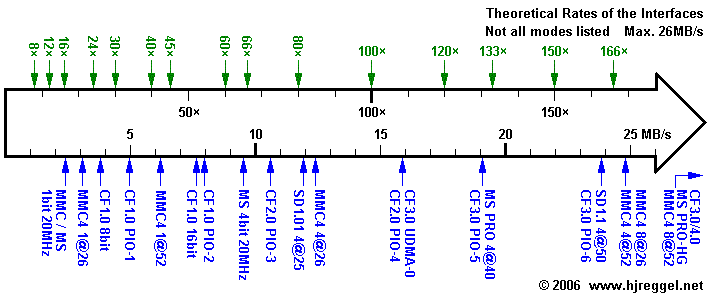
This is the detailed view on the lower end of the full scale:
In the range up to 25MB/s, CF, SD, MMC and MS are equally good represented.
The theoretical limits in this range are 19.07MB/s for the
MS PRO mode (4bit 40MHz), 23.84MB/s for the
fastest SD 1.1 mode (4bit 50MHz), the same for
the fastest CF PIO mode (PIO-6), and 24.80MB/s for the
half-speed modes of MMC 4 (4bit 52MHz or 8bit 26MHz).
Only MMC 4, MS PRO-HG and the CF UDMA modes offer faster speed.
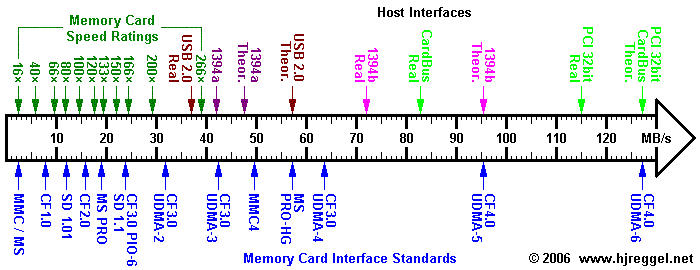
Below is the full range of current memory card interface standards.
The top row shows the memory card speed ratings on the
left side and the theoretical and real-world data rates of
popular host interfaces on the right side.
The bottom row shows the memory card interface standards.
Only the 8bit 52MHz mode of MMC 4, the 8bit 60MHz MS PRO-HG and the
CF-ATA modes from UDMA-2 to UDMA-6 offer higher speeds than 25MB/s.
USB 2.0 Card Readers should be fine for up to 30MB/s (200x).
The fastest FireWire 400 (1394a) CF readers should just be able to keep
up with the claimed 40MB/s (266x) speed of the SanDisk Extreme IV CF,
while their FireWire 800 (1394b) Extreme CF reader should be able to
show significant improvement with the next generation of Extreme CF
cards. CardBus adapters should have even more potential than that,
but the controller chips used often limit the data rates well
below the performance of current USB 2.0 readers - especially for
media other than CF.
Card Sized Adapters
This is a list of memory card adapters that have
exactly the size of another card type.
PCMCIA / PC-Card Adapter
- CF-I to PCMCIA-II
- This is the most commonly available adapter type for PCMCIA.
The CF-I card with a
thickness of 3.3mm is inserted into the PCMCIA-II card with a thickness
of 5mm. The adapter just contains wiring from the 50-pin CF slot to the
68-pin PCMCIA connector.
- CF-II to PCMCIA-II
- This solution is a little more tricky, because CF-II and PCMCIA-II
have exactly the same
thickness. The PCMCIA-II adapter has a big notch, and both, CF-I and
CF-II cards, are only guided by two rails. In most cases,
the pins of the CF slot are protected by a spring-loaded
protective shield with matching holes for the pins of the CF slot.
As stated before, the adapter just contains wiring from the 50-pin
CF socket to the 68-pin PCMCIA connector.
- Other cards to PCMCIA-II
- The PCMCIA-II format is large enough to fit any of the other card types.
There is just more or less electronics necessary to translate between the
different interfaces.
There are multi-card adapters available where you can insert one of
multiple card types at a time, usually SD, MMC, MS, MS Pro and
SmartMedia.
The latest models also support xD-Picture Cards, but the big challenge is
the limited slot area and the different locations of the contacts.
Some of the adapters supporting xD-Picture cards won't accept
SmartMedia.
In general, the cards are inserted completely into the PCMCIA Adapter
from the front edge so that the cards sit flush with the edge.
This means that the smaller card types can only be used with
the respective adapters. There are special adapters that
don't accept SmartMedia and have two slots next to each
other: One slot for the regular types and a second slot for
MS Duo and miniSD.
CardBus Adapter
- CardBus adapters (PCMCIA Type II size)
- There are CardBus adapters available which are a quite expensive
way of dealing with the bad performance of the old PCMCIA-ATA interface.
The following adapters are available:
- CardBus CF-I/II adapter
- CardBus SD/MMC adapter
- CardBus Memory Stick adapter
- CardBus Multi Adapter (SD/MMC/MS/xD)
CF Adapter
- SD/MMC to CF-I card
- This is a special adapter solution which was first distributed by
Minolta and Panasonic. In the meantime, these
adapters are also available from cheaper sources.
The SD or MMC cards can be inserted fully into the CF-I adapter, so that
it can be used in a regular closed CF type I slot. The adapter
card contains the necessary electronics to translate between the
two interfaces.
There are also CF-II adapters and longer CF-I adapters available. It should
be obvious that they are only of limited use.
- xD-Picture Card to CF-I card
- This is another special adapter solution distributed by FujiFilm and
Olympus.
The xD-Picture Card can be inserted fully into the CF-I adapter, so that
it can be used in a regular closed CF type I slot.
The adapter card contains the necessary electronics to translate
between the two interfaces.
- MS Duo to CF-I card
- This is a special adapter solution distributed by SONY.
The Memory Stick Duo can be inserted fully into the CF-I adapter, so that
it can be used in a regular closed CF type I slot. The adapter
card contains the necessary electronics to translate between the
two interfaces.
This kind of adapter solution is not possible for the regular sized
Memory Sticks, since their length (50mm) exceeds the width
of a CF card (42.8mm).
Memory Stick Adapter
- MS Duo to MS / MS Pro Duo to MS Pro
- It was a design criteria of the Memory Stick Duo that it
can be inserted into a passive Memory Stick adapter card that just connects
the respective pins.
The Memory Stick Duo even has the same connector layout
as a regular sized Memory Stick. There are Memory Stick slots that
have special guides so that both, regular sized Memory Sticks and
Memory Stick Duo can be inserted. Inserting a Memory Stick Duo in a regular
Memory Stick slot can result in bent or damaged connectors inside the slot.
- Memory Stick Micro (M2) to Memory Stick PRO
- It was a design criteria of the Memory Stick Micro (M2) that at
can be inserted into a passive Memory Stick PRO adapter.
- Memory Stick Micro (M2) to Memory Stick PRO Duo
- Unlike microSD or MMCmicro, the
Memory Stick Micro have special guides that allow the
use of adapters without top cover. This makes it
easier to build Adapters from Memory Stick Micro
to Memory Stick PRO Duo. But these adapters are still
hard to find.
- microSD to Memory Stick PRO Duo
- This was the first solution
that allowed a "foreign"
memory card type to be used in Memory Stick slots.
- MBridge to Memory Stick PRO Duo
- The MBridge is a hybrid SD/MS flash module
that comes with different adapter shells.
One of the adapter allows the use of the MBridge
as Memory Stick Duo. An adapter to full-size
Memory Stick is not included, but of course
regular MS Duo to MS adapters can be used.
SD Adapter
- miniSD to SD card
- It was a design criteria of the miniSD format that miniSD cards
can be inserted into a passive SD card adapter that just connects
the respective pins. The miniSD cards use the same interface, but
a different connector layout.
- microSD/TransFlash to SD card
- It was a design criteria of the microSD or TransFlash cards that they
can be inserted into a passive SD card adapter that just connects
the respective pins. The additional ninth pin of the SD cards
is just a redundant ground connector.
- microSD to miniSD
- Although the difference in thickness is only 0.4mm,
it is possible to build adapters, but they are hard to find.
- MMCmicro to SD slot
- It was a design criteria of the MMCmicro that they
can be used with a passive adapter that just connects
the respective contacts. However, the regular adapters
supplied with most MMCmicro have SD form factor, so
that they only fit SD/MMC combo slots. Besides the
form factor of these adapters, there is no disadvantage,
because MMCmicro only use 4 bit of the MMCplus interface
and the lower 4 bit can be transfered using the 9 pins
of the SD interface.
- miCARD to SD slot
- It was a design criteria of the miCARD that it
can be used with a passive adapter that just connects
the respective contacts. Due to the thickness of
1.95mm, the miCARD can only be used in CD/MMC combo
slots. The passive adapter connects the miCARD to
the respecitve pads. Currently it is unknown whether
the miCARD will support only 4-bit or the full 8-bit
MMCplus interface, and whether the adapter connects
all eight data lines.
- MBridge to miniSD and SD
- The MBridge is a hybrid SD/MS flash module
that comes with different adapter shells.
The MBridge module has exactly the same pad layout as
miniSD, the adapter shell just adjusts the width and
thickness to fit a miniSD slot. An adapter from
miniSD to SD is also included.
MMC Adapter
- RS-MMC to MMC
- The RS-MMC ist just a short version of the MMC with exactly the same connector
layout. For MMC slots where the card has to be inserted deeper than the length of
a RS-MMC there are snap-on adapters available. These adapters simply extend the
RS-MMC physically, so that it can be handled in the same way as a regular sized MMC.
- MMCmicro to MMC
- Although there is only a difference of 0.3mm between
MMCmicro and MMC, there seem to be MMCmicro to MMC
adapters available. The main problem ist that the
contacts have to go underneath the MMCmicro, on
top there can be a very thin layer as cover.
Cards with USB Connector
- SD with USB Plug
- There are SD cards with built-in USB plug
available. Some of the cards have a detachable
part, others have a flip-over part that
reveals the USB plug. The cards introduce more
or less mechanical problems with snap-in/snap-out SD
slots, so they should always be inserted and
removed with special care.
- microSD to SD with USB plug
- This is the most complicated type
of adapter: The microSD is inserted at
one side of the SD/USB card. This does
not leave much room for the contacts
and the USB controller.
- miCARD to USB
- It was a design criteria of the miCARD
that it can be directly plugged into a
regular USB host connector. This is
the reason for the width of 12mm and the thickness
of 1.95mm. Only the length of the miCARD could
be chosen by the designers.
Other Adapters
Of course there are many odd-sized adapters available. This is just a list of
some special types.
- PCMCIA slot to ATA
- The PCMCIA interface can be hardwired to the ATA interface.
Pleaso note that only PCMCIA-ATA cards will work this way.
- CF slot to ATA
- Because CF can be hardwired to PCMCIA, it should be obvious that
a CF slot can be hardwired to the ATA interface. There
are adapters available with 40-pin ATA or 44-pin ATA connector. The
power connector is either a large harddisk type or a small floppy disk
type power connector. Only CF cards and
microdrives that are compatible with the CF-ATA protocol will work.
CF cards and Microdrives should accept both, 5V and 3.3V operating
voltage. With these adapters, the CF slot is usually powered directly
from the 5V line of the power connector.
-
- PCMCIA slot to CF card
- The two hardwired solutions from CF to PCMCIA also work the other
way round. PCMCIA memory cards should work without any problems.
PCMCIA harddisks might exceed the power limit of the CF slot,
especially for CF slots of host powered card readers.
Even some PCMCIA I/O cards will work if you can install the drivers
on the host device. In general, this only applies to PDAs
and Pocket PCs.
- xD-Picture Card to SmartMedia
- It was a design criteria of the xD-Picture Card to be electrically
compatible to the SmartMedia interface. The 18 pins of the xD-Picture Card
can be hardwired to the 22 connectors of a SmartMedia Card. If you
look closer at a SmartMedia card, you will notice that some of the 22
contacts are connected to each other.
Please note that SmartMedia are limited to 128MB by design. This means
that xD-Picture Cards of more than 128MB will most likely not work
when used in a SmartMedia slot together with such an adapter.
If you still think that you need such an adapter, check the prices first.
I have seen adapters advertised in the range from 4.50 to 20 Euro.